

For hospitals and health systems
Hospital asset tags and labels for biomed, IT, supply rooms, and plant ops.
Control-number tags for the pumps and monitors that move between units, printed under a laminate that resists solvents and abrasion. Shelf and bin labels for par locations, and numbers that continue the sequence in your CMMS.
Biomed control tags · Department color headers · Barcode or QR for your CMMS · Tamper-evident VOID · Par location bin labels · Sizes down to .3″ × 1″
Family-run since 1982 · Purchase orders accepted · 800-524-0599
Family-run since 1982
Scan the pump wherever it ends up
- ✓Purchase orders accepted
PO or card at checkout - ✓Numbers that match your CMMS
New tags continue the control numbers you use - ✓Samples before you commit
Test them against the wipes your units use
“We have been working with ParCode for more than 20 years. They are dependable, knowledgeable, and always help us select the right materials for our various applications. Great products and even better service.”
William J., IKEA
What do you need to tag?
Pick your department, or scroll through all four.
Biomed and HTM
Clinical equipment
Pumps, monitors, beds, and anything on wheels.
See biomed tags ↓
Hospital IT
IT & mobile devices
WOWs, scanners, tablets, and label printers.
See IT tags ↓
Materials management
Supply rooms & carts
Bin labels, printed in shelf order.
See supply labels ↓
Plant operations
Plant & building equipment
Air handlers, chillers, generators, and kitchens.
See plant tags ↓
What goes on the tag
| Field | Why it is there |
|---|---|
| Hospital or health system name | Ownership when a device turns up on another unit |
| Control or asset number | The key to the device record in your CMMS |
| Barcode (Code 128 or Code 39) | Fast scans on PM rounds and inventory counts |
| QR code | For staff who scan with a phone or tablet |
| Color header by department | Shows where a borrowed device belongs |
| Biomed or help desk phone | Who to call when a device fails on the floor |
| Serial number | A check against the manufacturer’s label |
| Equipment type or model | Tells a tech what the unit is without a lookup |
Your prefix, campus code, and digit count carry over, starting at the next number in the series.

Biomed & clinical engineering
Biomed asset tags for equipment that never stays on one unit.
A pump gets borrowed by the unit next door, wiped between patients, and parked in the wrong utility room. If its tag has faded, biomed finds the pump and still can’t tell which one it is.
The print on a ParPlus tag sits under a clear laminate that resists solvents and abrasion.
- Numbers that pick up where your last biomed tag left off
- Color headers by department, so nursing can see where a borrowed pump belongs
- Barcode or QR that your CMMS and handheld scanners read
- Sizes down to .3″ × 1″ for handheld devices with little flat space
Hospital IT
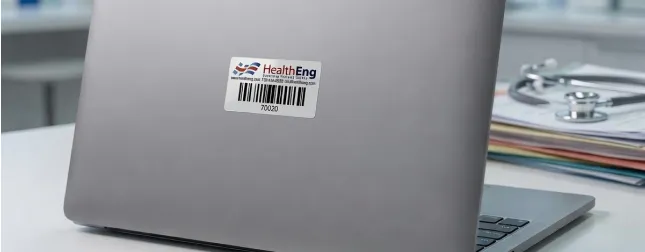
IT asset tags for workstations on wheels and the devices that ride on them.
A go-live or a refresh puts hundreds of devices on the floors in a few weeks. Tag each one in the staging room, and the number in your IT inventory matches the device from day one.
Carts and scanners get wiped down on the floor like the pumps do. They take the same laminated ParPlus tag.
- “Property of” your health system, with the IT help desk number
- ParVoid tags that leave “VOID” on the device if someone peels one off
- ParDestruct vinyl that breaks apart instead of moving to another laptop
- A separate prefix and series for carts, scanners, and tablets
Materials management & supply chain
Medical supply room labels built from your item list.
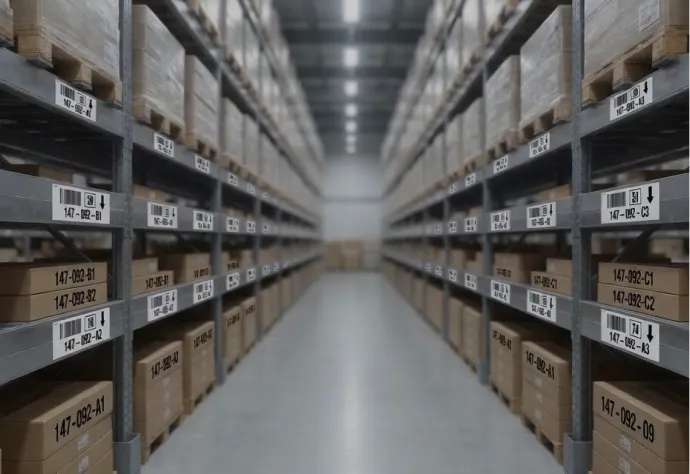
Clean supply rooms and supply carts run on par levels. We lay out one label per bin from the item list in your materials system. The labels carry the item number, description, par quantity, and a barcode for counts and reorders.
- Printed in shelf order, so whoever puts them up works down the room without sorting
- Removable labels for bins that get re-slotted when pars change
- Color coding by room or by cart
- A barcode your materials system reads, confirmed with you before we print
Facilities & plant operations
Hospital equipment labels for mechanical rooms, rooftops, and kitchens.
Air handlers, chillers, generators, and kitchen equipment need numbers your work-order system knows. Once they’re tagged, the tech on a PM scans the unit in front of them instead of guessing from the room number.
- Outdoor and UV-resistant materials for rooftop units and the generator yard
- Chemical-resistant constructions for mechanical rooms and kitchens
- A header color that sets plant tags apart from biomed’s
How it works
Start from the list your department already keeps: a CMMS export, an IT inventory, or a supply item list.
1
Tell us what you’re tagging
Device counts, the control numbers you use now, and where the tags go. A photo of the tag on a pump or a monitor is enough to start.
2
We set the construction
Size, material, header color, and barcode or QR, chosen for the device surface and the scanners your techs carry.
3
You approve a proof
Nothing prints until the layout and the numbering are right.
4
Delivered in number order
Printed from your starting number, ready to apply at incoming inspection or on the next PM round.
Options
Standard sizes cover pumps and carts down to handheld devices. Custom sizes, shapes, and multi-part tags are available too.
Sizes & constructions
- .75″ × 2″, 1″ × 2″, and .675″ × 2″ for pumps, monitors, and carts
- .5″ × 1.5″ and .3″ × 1″ for handheld devices
- Custom sizes for devices with crowded or curved surfaces
- Code 128, Code 39, QR, or Data Matrix
- Sequential control numbers with your prefix
Printing
- Hospital or health system logo
- Color header by department or campus
- “Property of” wording
- Biomed or IT help desk phone number
- Equipment type or model line
Materials
ParPlus polyester (white or silver): printed under a protective laminate that resists solvents and abrasion.
ParVoid tamper-evident: leaves the word “VOID” behind if someone removes it.
ParDestruct vinyl: breaks into small pieces if anyone tries to peel it off.
For a standard control-number tag, design it online with a live preview. The online minimum is 250 tags, from $122.50, shipped free.
FAQs
Questions hospital teams ask
ParPlus tags are printed under a laminate that resists solvents and abrasion. Wipes vary. Try samples with the ones your units use before you order.
Yes. The new tags continue from the last number you issued, in the same format, with any prefix or campus code.
Yes. Photograph it or mail us one, and we rebuild the layout, the stripe color, and the number format.
Yes. Choose Purchase Order at checkout and enter the number from your purchasing department, or pay by card.
250 tags is the smallest online order, from $122.50 with free shipping. For a system-wide rollout, custom sizes, or more than 10,000 tags, request a quote.
Barcodes for the handheld scanners biomed and materials management already carry. QR when staff scan with phones or tablets, or when the code should open a link to the device record. We confirm which one your CMMS expects before we print.
Yes. The .5″ × 1.5″ and .3″ × 1″ sizes are in the online designer, and we cut custom sizes for devices with even less flat space.
Yes. We lay out the labels from your item list, with the fields you choose, and print them in the order they go on the shelves.
Yes. A separate header color and prefix keep rentals and loaners in their own series, apart from the equipment you own.
Yes. We supply barcode printers, die-cut label stock, and ribbon for the bin and receiving labels your materials system prints, and quote them with your tags.
Get pricing for hospital asset tags and supply room labels.
Send a photo of your current tag, the next control number, and how many devices you’re tagging. We reply with a layout and a price.
- Tags numbered from your CMMS
- Purchase orders accepted
- A proof before we print

Or ask Frankie.
He’s helped thousands of customers find the right label. 800-524-0599
Get a Quick Quote
Frankie often replies within minutes.
